Payment Processing for Small Businesses Made Simple
Picking the right way to take payments is a huge deal for any small business. It’s not just about getting paid; it’s about your cash flow, your customers’ trust, and your ability to grow. The right system should have clear fees, be easy to set up, and keep everything secure. Think of it as the central nervous system for your sales.
Why Smart Payment Processing Matters for Growth
Your payment processor isn't just a tool for collecting money - it’s the engine that powers your business. If that engine is clunky, expensive, or unreliable, it creates friction at the worst possible moment: right when a customer is ready to pull out their wallet. That friction leads to abandoned carts, lost sales, and a reputation you didn’t ask for.
On the flip side, a smooth payment experience builds confidence and keeps people coming back. When customers can pay quickly and safely with their favorite method, they see your business as professional and trustworthy. This seamless checkout isn't a luxury anymore; it's what people expect.
The Foundation of Financial Health
For a small business, cash is king. Slow payment processing can create serious bottlenecks, tying up the money you need for inventory, payroll, or marketing. Waiting days for your funds to clear can mean the difference between jumping on a new opportunity and falling behind the competition.
An efficient payment system delivers real benefits:
- Improved Cash Flow: Getting your money faster means you can put it back into the business sooner.
- Enhanced Customer Experience: A simple checkout means fewer abandoned carts and happier customers.
- Reduced Admin Work: Automation and integration with tools like Widgetly mean less time spent on manual data entry.
- Stronger Security: Modern processors handle the complex world of compliance and fraud protection, keeping both your business and your customers safe.
A great payment processor doesn’t just move money. It streamlines operations, secures transactions, and provides the data you need to make smarter business decisions, ultimately fueling your growth.
A Partner in Your Success
At the end of the day, your payment processor should feel like a partner, not a hurdle. The right solution will grow with you, adapting as you add new sales channels or as customer preferences change. This is why so many businesses look for vendors that are reliable and offer features that can scale.
In fact, research shows that 72% of small and mid-sized businesses feel that payment processors offer the best systems to support their financial needs - especially those with fast global transactions and solid fraud protection. The total value of payments handled through these channels is expected to hit $6.5 trillion by 2025, which just goes to show how critical this infrastructure is for business today. You can learn more about payment processing industry trends from recent studies.
How a Customer Payment Actually Works
Ever wonder what happens in those few seconds between a customer tapping their card and the money hitting your account? It feels like magic, but it’s actually a high-speed, secure process happening behind the scenes. Think of it as a financial relay race, where your customer’s payment information is the baton, passed safely between several key players in the blink of an eye.
Getting a handle on this journey is the first step to mastering payment processing. It demystifies all those little fees and shows you why security is non-negotiable. Once you know how it all works, you can talk to providers with more confidence and make smarter choices for your business.
The Key Players in the Race
Before we follow the baton, let's meet the runners. Each one has a specific job to make sure the transaction is fast, legitimate, and secure.
- The Customer (and their Issuing Bank): The race starts with the customer and their credit or debit card. That card comes from their bank, known as the issuing bank, which either extends them credit or holds their funds in a checking account.
- Your Business (The Merchant): You're the merchant! You provide the starting line - whether it’s a checkout counter, a website, or an online invoice.
- The Payment Gateway: This is your digital bodyguard. It’s the technology that securely captures the customer's payment details and encrypts them for safe travel.
- The Payment Processor: Think of the processor as the race coordinator. It routes the transaction information between all the other players, making sure everyone is on the same page.
- The Acquiring Bank (Your Merchant Bank): This is the bank that provides your merchant account - a special account that lets you accept card payments. It receives the money on your behalf before it lands in your regular business bank account.
These players work together flawlessly every single time you make a sale.
The Three Stages of a Transaction
A single transaction zips through three main stages: authorization, clearing, and settlement. This infographic gives a great visual of how a payment gets from your customer all the way to your bank account.
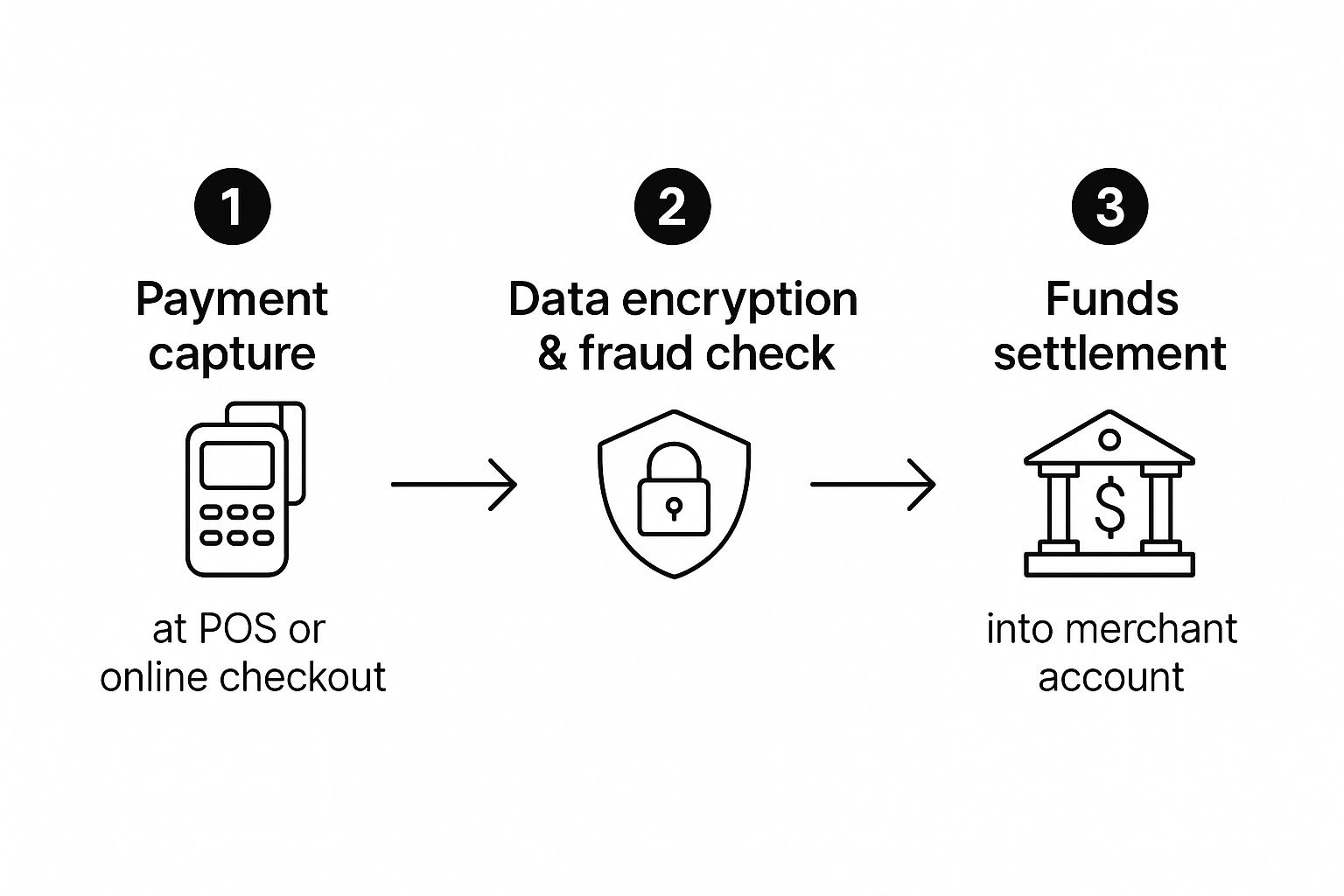
This whole process is built on critical handoffs and constant security checks. Let's break down each step of that journey.
Step 1: Authorization - The Starting Gun
The moment a customer swipes their card or clicks "Pay Now," the race is on. This is the authorization stage, and it happens almost instantly.
- Your terminal or website sends the customer's card details to the payment gateway.
- The gateway encrypts the data and zips it over to the payment processor.
- The processor sends the request to the card network (like Visa or Mastercard), which then passes it to the customer’s issuing bank.
- The issuing bank checks for things like sufficient funds and potential fraud. It then sends an "approved" or "declined" message all the way back down the line.
This entire round trip usually takes less than two seconds. When you see "Approved" on your screen, it’s the issuing bank’s promise that the funds are good.
Key Takeaway: Authorization isn't the actual transfer of money. It's a super-fast conversation that confirms the customer can pay and puts a hold on the funds.
Step 2: Clearing - The Middle Leg
At the end of the day, you'll "batch out" all your approved transactions. This is where the clearing stage begins. The processor bundles up these transaction records and sends them off to the correct card networks.
The card networks then clear the transactions with the corresponding issuing banks. This is the official record-keeping part of the race, where everyone double-checks their notes. It's also when interchange fees - the fee paid to the customer's bank for the privilege of the transaction - are calculated.
Step 3: Settlement - The Finish Line
Finally, we get to settlement. This is when the money actually moves. After clearing, the issuing bank sends the funds (minus its interchange fees) to your acquiring bank. Your acquiring bank then deposits that money into your merchant account.
This final step is the reason it often takes 1-3 business days for the cash from a sale to show up in your account. The process makes sure every cent is accounted for and transferred securely, completing the payment race.
Understanding the Real Cost of Payment Processing

Let’s be honest - confusing fees are one of the biggest headaches for any small business owner. When you’re busy serving customers and trying to grow, the last thing you need is a surprise on your monthly statement. The reality is, not all payment processors charge the same way, and getting a handle on these differences is crucial for protecting your profit margins.
Think of it like choosing a cell phone plan. Some plans offer a simple, predictable monthly bill. Others have variable rates that could save you money - or end up costing you a lot more. The right choice depends entirely on your business, specifically your sales volume and average transaction size.
Let's unpack the three main pricing models you'll run into.
The Three Core Pricing Models
Each of these models bundles the various fees - interchange, assessments, and the processor’s own markup - in a different way. Knowing how they work is the key to understanding where your money is actually going.
-
Flat-Rate Pricing: This is the "unlimited data" plan of payment processing. You pay a single, fixed percentage plus a small fee for every transaction (like 2.9% + $0.30), no matter what kind of card the customer uses. It’s wonderfully simple and predictable.
-
Interchange-Plus Pricing: Think of this as the transparent, "pay-as-you-go" option. You pay the direct wholesale cost from the card network (the interchange fee) plus a clearly disclosed, fixed markup from your processor. No guesswork.
-
Tiered Pricing: This is the confusing "bundle" plan. The processor lumps hundreds of different interchange rates into just a few buckets - usually called Qualified, Mid-Qualified, and Non-Qualified. This model often feels like a black box, since the processor decides which of your sales get shoved into the more expensive tiers.
While Tiered pricing was once common, most experts now advise against it because it's so easy for hidden costs to creep in. For most small businesses, the real choice is between the predictability of Flat-Rate and the transparency of Interchange-Plus.
Fee transparency is everything when it comes to payment processing for small businesses. A lower advertised rate means nothing if confusing tiers and hidden charges are quietly eating away at your revenue.
Comparing Payment Processing Pricing Models
Choosing the right structure is a strategic decision. A business with high sales volume might save thousands with one model, while a brand-new startup will likely prefer the sheer simplicity of another.
This table breaks down the three main pricing models to help you see which might be the most cost-effective for your business.
| Pricing Model | How It Works | Best For | Pros | Cons |
|---|---|---|---|---|
| Flat-Rate | A single, predictable rate for all transactions (e.g., 2.9% + $0.30). | Startups, businesses with low sales volume, or those with small average transaction sizes. | Extremely easy to understand and predict costs. | Can be more expensive for businesses with higher sales volume. |
| Interchange-Plus | The wholesale interchange rate plus a fixed processor markup. | Established businesses with high sales volume or large average transaction sizes. | Very transparent; you see the exact wholesale cost. Potentially the most cost-effective model at scale. | Monthly statements can be complex and harder to read. |
| Tiered | Transactions are bundled into tiers (e.g., Qualified, Non-Qualified) with different rates. | Generally not recommended for most small businesses. | Simple on the surface. | Lacks transparency; processors can route transactions to more expensive tiers, inflating costs. |
As you can see, the best choice really comes down to your specific business profile. What works for a local coffee shop probably isn’t the best fit for a fast-growing online store.
Looking Beyond the Transaction Fee
While the processing rate gets all the attention, it’s not the only cost you need to worry about. Several other fees can pop up on your statement, and knowing what to look for can help you avoid some nasty surprises down the road.
Properly identifying these expenses is a core part of good financial management. In fact, learning how to track business expenses is one of the most important first steps for any new owner.
Keep an eye out for these common additional charges:
- Monthly Account Fees: This is a fixed fee just for keeping your account open, usually between $10 to $40.
- PCI Compliance Fees: A charge to ensure you are compliant with the Payment Card Industry Data Security Standard. This might be a monthly or annual fee.
- Chargeback Fees: If a customer disputes a charge and you lose, the processor hits you with a fee, often between $15 and $25 for each incident.
- Monthly Minimums: Some processors require you to generate a certain amount in fees each month. If your sales are slow and you fall short, you have to pay the difference.
Before you sign any contract, always ask a potential provider for a complete and total fee schedule. A good partner will be upfront about all potential costs, which lets you accurately forecast your expenses and make the best decision for your business's financial health.
How to Choose the Right Payment Processor
Picking a payment processor is one of those big decisions that can feel a little overwhelming. With so many options out there, how do you find the one that’s actually right for your business? The secret is to look past the flashy transaction rates and really dig into how a processor fits with how you operate, where you want to grow, and the tools you already use.
Think of it less like picking a software and more like hiring a key team member. You wouldn't just look at their resume; you'd want to know if they have the right skills, good references, and if they'll click with your team. Your payment processor is no different - it needs to slide right into your workflow, support all the ways you sell, and be a reliable partner.
Start by Looking in the Mirror
Before you even glance at a single provider’s website, the first step is to get crystal clear on your own needs. A solid understanding of your business will be your North Star, helping you cut through the marketing noise and zero in on what truly matters. After all, what’s perfect for a busy coffee shop is probably a terrible fit for an online subscription box.
Ask yourself a few simple but crucial questions:
- Where do you sell? Are you 100% online, running a brick-and-mortar shop, slinging products at a farmer's market, or doing a bit of everything? Your sales channels will determine the kind of hardware and software you need.
- What's your average sale? A bakery selling dozens of small-ticket items has very different cost pressures than a consultant with a few high-value clients.
- How much do you sell each month? If you're just starting out with unpredictable sales, a simple, no-commitment plan is your best friend. But if you have steady, high volume, you can often unlock better rates with different pricing models.
Once you have these answers, you'll have a solid profile of your business. This makes it infinitely easier to spot the processors that are a genuinely good match.
All-in-One vs. Traditional: Understanding Your Two Main Paths
When it comes to payment processing for small businesses, you're generally looking at two main options: all-in-one solutions (often called Payment Service Providers or PSPs) and traditional merchant accounts. They each have their own pros and cons.
PSPs like Square and Stripe are the darlings of the small business world for a reason. They bundle everything you need - the payment gateway, the merchant account - into one simple package with predictable, flat-rate fees. They’re known for their lightning-fast setup and easy-to-use interfaces. Square, for example, is incredibly popular with new businesses, charging 2.6% + $0.10 per in-person transaction and 2.9% + $0.30 for online transactions, with no monthly fees on their standard plans. This has been a game-changer for startups and mobile sellers. You can see more options in this handy breakdown of top payment processors.
On the other side of the coin is the traditional merchant account. This is a dedicated bank account you set up specifically for processing payments. This route can offer more tailored pricing structures, like Interchange-Plus, which can be a lot cheaper for businesses with serious sales volume. The catch? The application process is usually more intensive, and the fee statements can be a bit more complex to navigate.
The bottom line: All-in-one solutions are built for speed and simplicity, making them perfect for new or lower-volume businesses. Traditional merchant accounts can offer big savings as you scale, but they require a bit more legwork upfront.
Look for Smart Integrations That Do the Work for You
Your payment processor shouldn't be an island. To run an efficient business, it needs to talk to all the other software you rely on every single day - your accounting platform, your e-commerce store, your CRM, you name it.
This is where the magic of integration comes in. When your systems are connected, you eliminate hours of mind-numbing manual data entry, slash the risk of human error, and get a much clearer, real-time view of your company’s financial health. Think about it: when your sales data automatically zaps over to your accounting software, bookkeeping becomes a breeze.
This is the core idea behind smart automation. In our guide to small business automation tools, we talk about how connecting your systems is the key to unlocking massive time savings. So before you sign on the dotted line, make sure your chosen processor plays nicely with the tools your business already depends on. A processor that fits into your existing tech stack is a partner that will help you grow smarter, not just work harder.
Keeping Your Customer Payments Safe and Secure
Let's be honest: protecting your customer's data is more than just a good idea - it's everything. One data breach can destroy the trust you’ve worked so hard to build. Security isn't some back-office IT task; it’s a fundamental part of running a smart business.
Think of your payment system as a digital vault. Every time a customer pays you, they're handing over sensitive financial information. Your responsibility is to make sure that vault is completely locked down. Thankfully, you don't have to do it alone. Modern payment processors handle most of the heavy lifting.
Understanding PCI Compliance
You're going to run into the term PCI DSS (Payment Card Industry Data Security Standard). It sounds technical and a bit scary, but the idea behind it is simple. It's just a set of security rules created by the big credit card companies (Visa, Mastercard, etc.) to keep customer data safe.
If you accept cards, you have to play by these rules. For most small businesses, this boils down to a few key things:
- Use the right gear: Always use a payment processor and card reader that is certified as PCI compliant.
- Don't store sensitive data: Never, ever save full card numbers or CVV codes on your own computers or servers.
- Keep your network secure: Make sure your business Wi-Fi and network are password-protected and secure.
The best part? Simply choosing a reputable payment processor gets you most of the way there. They’re designed to keep sensitive card data off your hands, which massively cuts down on your risk and compliance headaches.
Your Digital Security Guards: Encryption and Tokenization
So how does a processor actually keep the data safe? They use two brilliant technologies that work in tandem like a high-tech security team: encryption and tokenization.
Encryption is the first line of defense. The second a card is swiped, tapped, or the number is typed online, the data is instantly scrambled into an unreadable code. Think of it like a secret language that only the payment processor can understand. Even if a hacker intercepted it, all they’d get is useless gibberish.
Tokenization is the next clever step. Once the encrypted transaction is approved, the processor swaps the actual card number for a unique, random string of characters called a "token." You can safely store this token for things like recurring billing or processing refunds, but the original card details are never exposed.
Together, encryption and tokenization are the foundation of secure payments. They let you offer a smooth checkout experience without the massive liability of holding onto your customers' financial information.
Defending Against Fraud and Chargebacks
Security is also about protecting your bottom line from fraudulent transactions and the nightmare of chargebacks. With global fraud losses climbing past $40 billion a year, this isn't a problem you can afford to ignore. For more on this, check out the latest payment industry challenges on PayCompass.
The good news is that your payment processor is fighting back for you. Most now include sophisticated, AI-powered fraud detection tools that look for red flags in real-time. These systems often include:
- Address Verification Service (AVS): This confirms that the billing address entered by the customer matches the address the bank has on file for that card.
- CVV Verification: That little three or four-digit code on the back of the card? Requiring it proves the customer actually has the card in their hand.
- Velocity Checks: The system can flag suspicious patterns, like a high number of transactions from the same person or IP address in a very short amount of time.
Using these tools builds a much stronger defense against fraud. It helps you keep the revenue you earn and, most importantly, protects the trust you've built with your customers.
Your Step-by-Step Guide to Getting Started
Alright, let's turn all this theory into action. Now that you have a handle on the key players and how they charge, it's time to get your own payment system up and running. I'll walk you through it, step-by-step, so you can go from application to your first sale without any technical headaches.
The first thing you'll need to do is gather your documents. Think of it like applying for a business loan - the processor just needs some basic info to verify who you are and what your business does. It's a standard security check.
The Application and Approval Process
Before you can accept a single payment, you need to get approved for a merchant account. Even the all-in-one solutions have a quick approval process, which is usually just a simple online form.
Here’s what you’ll almost always need to have on hand:
- Business Details: Your legal business name, address, and your Employer Identification Number (EIN). If you're a sole proprietor, your Social Security Number will work.
- Ownership Information: Personal info for anyone who owns 25% or more of the company.
- Bank Account Information: The routing and account numbers for the business bank account where you want your money sent.
- Sales Estimates: A ballpark figure for your monthly sales volume and what your average sale amount looks like.
For simple platforms, approval can be almost instant. More traditional merchant accounts might take a few business days. The best way to avoid delays is to make sure everything you submit is accurate and complete.
Getting approved is the first green light. It’s the system's way of saying, "Okay, this business is legit and ready to go," moving you one step closer to taking your customers' money smoothly.
Integrating with Your Existing Tools
Once you're approved, it's time to plug the payment processor into your business. This is where a good integration can save you a mountain of manual work down the road. The goal is to make the payment process feel completely invisible to your customer, whether they're buying online or in person.
For an online store, this usually involves installing a plugin or using an API to connect the processor to your website’s shopping cart. Many platforms make this incredibly simple. For instance, you can easily add a payment option by using something like Widgetly's streamlined PayPal button for Notion and start selling directly from your pages.
If you have a brick-and-mortar shop, this part of the process is about setting up your point-of-sale (POS) hardware, like a card reader or terminal. Most modern systems are basically plug-and-play, connecting right to your tablet or computer.
No matter your setup, don't skip the final step: run a few test transactions. This is critical to make sure everything is working perfectly before you go live with actual customers.
Got Questions? We've Got Answers.
Alright, so you've picked a payment processor and you're ready to go. But what about the nitty-gritty, day-to-day stuff? This is where the rubber meets the road.
Let's walk through some of the most common questions we hear from business owners just like you. Getting these details right from the start can save you a ton of headaches down the line.
So, How Long Until I Actually Get My Money?
This is the big one, right? You made a sale, but when does that money hit your bank account? For most processors, the standard wait time is about 1 to 3 business days.
Why the delay? It’s because the money has to travel through that whole system we talked about earlier - clearing, batching, and bouncing between different banks. Keep in mind that weekends and holidays will slow things down. Some newer providers are starting to offer faster options, like next-day or even instant payouts, but they'll usually charge a little extra for the convenience.
What’s the Deal with Refunds and Chargebacks?
Handling returns and customer disputes is just part of running a business. Your payment system should make this pretty painless.
-
Refunds: Need to send money back to a customer? You can usually do it right from your sales terminal or online dashboard. The money goes back to their card, though it can take 5-10 business days for them to see it on their statement.
-
Disputes (a.k.a. Chargebacks): A chargeback is what happens when a customer tells their bank a charge wasn't right. When this occurs, you’ll get a notification, and the money for that sale gets put on hold. It’s then up to you to provide proof - like a signed receipt or shipping confirmation - to show the charge was legit.
A Word of Advice: When you get a chargeback notice, jump on it. The faster you respond with clear, solid evidence, the better your odds of winning the dispute and getting your money back. Don't let it sit.
Am I Stuck With My Processor Forever?
Not at all. You can - and should - switch if you find a better deal or if your current provider just isn't cutting it anymore. But there are a couple of things to watch out for.
Before you jump ship, dust off your current contract and look for an early termination fee (ETF). Some companies will charge you for leaving before your term is up. The other big question is about your customer data. Ask how they handle transferring saved payment info (tokens). A good partner will help you move everything over smoothly so you don't lose that valuable data or disrupt your sales.