
Time Tracking for Freelancers A Practical Guide
Let's be honest, time tracking for freelancers often feels like a chore. It's just one more thing to add to a to-do list that’s already a mile long. But what if I told you this one simple habit is the key to making more money, avoiding burnout, and actually feeling in control of your business? It’s not about micromanaging yourself; it's about getting crystal clear on where your time really goes.
Why Time Tracking Is a Freelance Game Changer

Think of it this way: you wouldn't run a business without knowing where your money is going, right? Time tracking is the exact same thing, but for your hours. It gives you a clear, honest look at where your most valuable resource—your time—is actually being spent. Without that data, you're just guessing, and making business-critical decisions based on a hunch is a recipe for disaster.
Solve Your Biggest Freelance Challenges
We’ve all been there: you send a proposal and immediately worry you’ve underbid. When you don't know exactly how long a certain type of project takes you, you're almost guaranteed to leave money on the table. Consistent tracking builds a library of your own project data, so you can price your next gig with total confidence.
Then there's the dreaded scope creep. It starts with a small "favor" and quickly snowballs, eating away at your profits. With a detailed time log, you have undeniable proof of the work you've done. This lets you have a firm but professional conversation with your client when a project starts to drift outside the original agreement.
Time tracking isn't about counting minutes. It’s about shifting your mindset from just doing the work to strategically running your business. It’s the data that fuels smarter pricing, better client relationships, and a healthier bottom line.
It's More Than Just Logging Hours
Ultimately, tracking your time is about understanding how you work best. You’ll quickly see your most productive times of day, identify those sneaky time-wasting habits, and figure out how to structure your schedule for maximum efficiency.
This isn't just a good idea; it's a massive trend. The market for freelance time tracking software is expected to skyrocket from $3.38 billion in 2024 to $11.48 billion by 2032. Why? Because freelancers are realizing that data is power. You can read more about this explosive market growth to see just how big this shift is. The most successful freelancers aren't just working hard; they're working smart, and it all starts with knowing their numbers.
Unlock Your True Earning Potential

When you’re a freelancer, time tracking isn't just about punching a clock. It's about gathering business intelligence. This simple habit is the key to understanding your business from the inside out, leading to some very real benefits that show up in your bank account and your work-life balance.
Ultimately, it all comes down to three things: making more money, getting more done, and building stronger relationships with your clients.
When you have hard data on your side, the guesswork just melts away. You can finally build quotes and proposals that truly reflect the value you bring to the table, making sure you get paid fairly for every ounce of your expertise. You’re no longer hoping for the best; you're operating with confidence.
Supercharge Your Profitability
Without tracking your time, you're pricing your services with one hand tied behind your back. You might feel like a project took "about 10 hours," but what if it was really closer to 15? That’s five full hours of your skill and effort that you just gave away for free.
Keeping a log of your time paints a crystal-clear financial picture. Let's say you discover that a blog post takes you two hours and brings in $150, but a small design project eats up four hours and only earns you $100. Suddenly, you have the exact data you need to start focusing on your most valuable work.
By understanding the true cost of your time, you can price your services accurately and protect your profit margins. It's the difference between running a hobby and building a sustainable business.
Boost Your Daily Productivity
Beyond just making more money, tracking your time is about working smarter. The data you collect is like a personalized roadmap to your own workflow, showing you exactly when you’re most focused and energetic. Are you a creative machine in the morning or do you hit your stride after lunch? Your time logs hold the answer.
This kind of self-awareness is a game-changer. It lets you schedule your most challenging tasks for when you’re at your best. It also shines a bright light on all those little "time sinks"—like endlessly checking emails or jumping between tiny, unrelated tasks—that secretly drain your day. Once you see these patterns, you can start building a workflow that truly works for you.
Here’s what that looks like in the real world:
- Identify Peak Hours: You can schedule your deep, focused work for when you know you’ll be in the zone.
- Eliminate Distractions: It becomes easy to spot and cut back on activities that aren't giving you much in return.
- Improve Focus: Just knowing the clock is running is often enough to keep you locked in on the task at hand.
Of course, knowing where your time goes is just one piece of the puzzle. To get a complete picture of your financial health, you’ll also want to learn how to track business expenses right alongside your hours.
Finding the Right Time Tracking Method
Let’s be honest: the best time tracking method is the one you’ll actually use. It's that simple. If a system feels like a chore, you'll ditch it within a week. The trick is to find a method that feels less like a burden and more like a natural part of your workday.
For some freelancers, simple is best. A basic spreadsheet or even a physical notebook can work just fine. This old-school approach costs nothing and gives you total control. The major downside? It’s a manual process, which means it’s incredibly easy to forget to log your time or make a simple math error that throws off your whole invoice.
Moving Beyond Manual Tracking
For most of us, dedicated time tracking software is a much smarter way to go. These tools can be anything from a simple, no-frills timer to a full-blown platform that also handles project management and invoicing. The goal is to find that sweet spot—getting the features you need without paying for a bunch of complicated extras you'll never touch.
Start by thinking about what you really need. Are you just trying to track billable hours accurately? Or do you want to dig deeper and see which projects are actually making you money? Do you juggle multiple clients and need to keep everything organized in one place? Nailing down your priorities will make the search a whole lot easier.
This decision tree can give you a good visual for figuring out where to start.
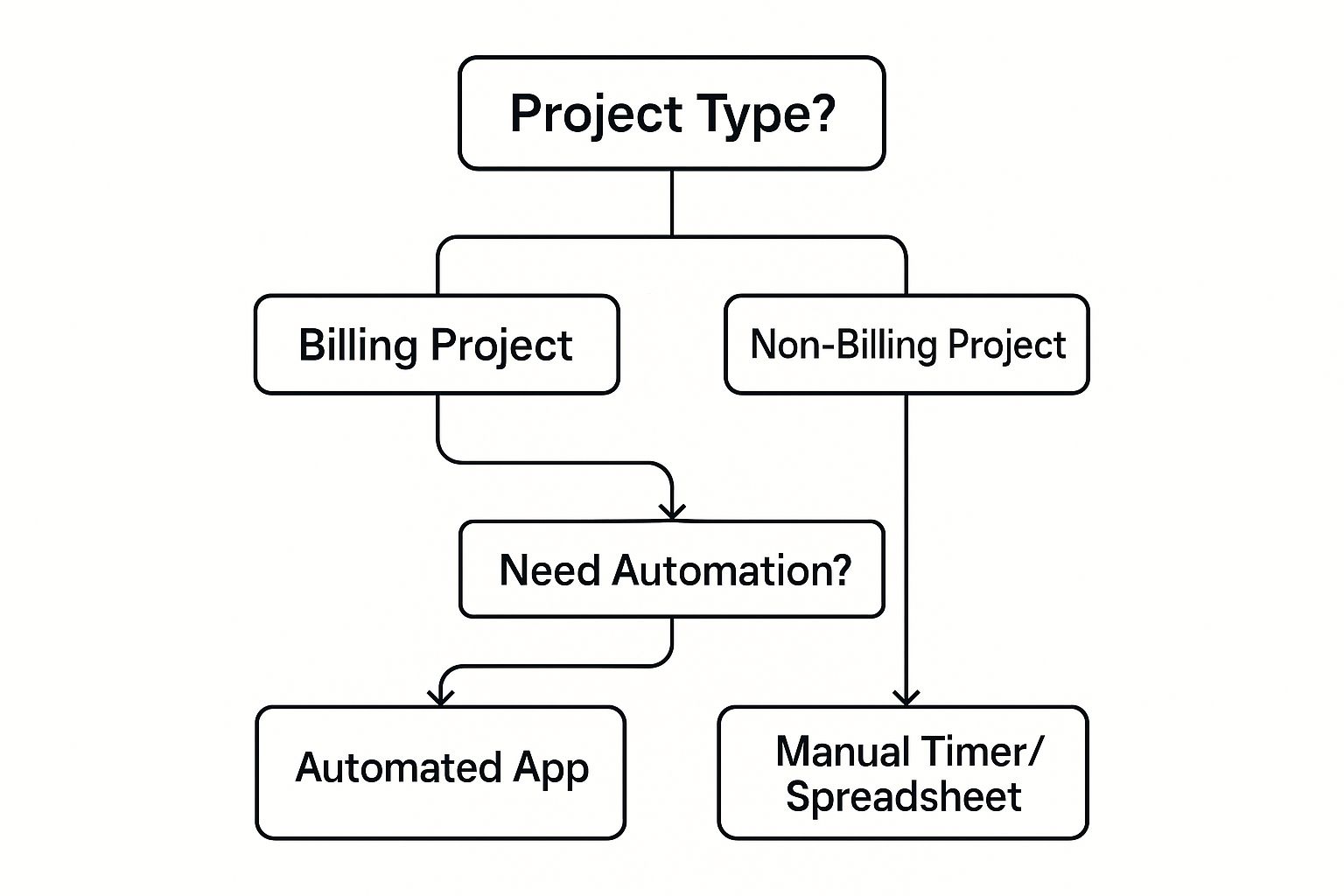
As you can see, the moment you need things to be more automated and less hands-on, a dedicated app starts to make a lot more sense than a simple spreadsheet.
Comparing Freelance Time Tracking Methods
To help you visualize the options, let's break down the most common methods freelancers use. Each one has its place, depending on your needs for simplicity, features, and accuracy.
| Method | Best For | Key Features | Pros | Cons |
|---|---|---|---|---|
| Notebook/Pen & Paper | Ultimate simplicity, tech-free workflows, and occasional tracking. | Manual entries for start/end times and tasks. | No cost, no learning curve, tangible record. | Prone to error, difficult to analyze, not scalable. |
| Spreadsheets | Freelancers comfortable with formulas who want a free digital solution. | Cells for dates, tasks, hours, and rates; basic formulas. | Free, customizable, familiar interface. | Requires manual data entry, easy to make mistakes. |
| Dedicated Timers | Focused work sessions and simple, project-based time logging. | Start/stop button, manual entry, project labels. | Easy to use, accurate, low distraction. | Limited reporting, often lacks invoicing features. |
| All-in-One Software | Freelancers managing multiple projects, clients, and invoices. | Time tracking, project management, invoicing, reporting. | Centralizes workflow, provides deep insights. | Can be complex, often comes with a subscription fee. |
Ultimately, moving from a manual method like a spreadsheet to an all-in-one tool is a common journey for a growing freelancer. You start simple and add more power as your business needs it.
Choosing Your Ideal Tool
When you're ready to look at specific apps, don't get distracted by a long list of features. Instead, focus on what will solve your biggest headaches.
- Ease of Use: Is the interface clean and intuitive? If it’s confusing, you’re not going to use it. It's as simple as that.
- Core Features: At a minimum, you need a simple start/stop timer, the ability to edit entries (because we all forget!), and a way to assign time to specific clients and projects.
- Reporting: Good software should turn your raw data into clear, easy-to-read reports. This is non-negotiable for invoicing and understanding your business.
- Integrations: Does it play nicely with the other tools you rely on, like your accounting software or project management app?
The right time tracking tool doesn't just count the minutes. It gives you real business intelligence. It helps you answer questions like, "Which of my clients are the most profitable?" and "How much time am I really sinking into non-billable admin work?"
To help you dive deeper into the specific options out there, check out our detailed time tracking software comparison. We break down the top tools on the market to help you find the perfect fit for your freelance business.
Building a Sustainable Time Tracking Habit
Picking a tool is the easy part. The real challenge—and where the payoff is—comes from turning time tracking for freelancers into a habit that sticks. Just like any new routine, consistency beats perfection every single time, especially when you're just starting out.
The whole point is to make logging your time so simple it becomes automatic. This starts with a fundamental choice: do you track in real-time, or do you try to piece it all together later? Hitting a timer the second you start a task is always going to be more accurate. It also has the nice side effect of keeping you focused. Trying to remember everything at 5 PM? That's just a recipe for guesswork and lost billable hours.
Best Practices for Consistent Tracking
To build a habit that actually lasts, your system has to be dead simple. Vague entries like "Client Work" are practically useless—they won't tell you anything meaningful. You need specific categories that actually paint a picture of how you spend your day.
Here are a few ground rules to set from the beginning:
- Use Clear Categories: Don't just track by client; track by project (e.g., "Client A - Website Redesign") and then by task ("Research," "Wireframing," "Client Call"). This level of detail is what turns a simple log of hours into business intelligence.
- Track Non-Billable Time: You're not just doing client work. You're also marketing your business, handling admin, and learning new skills. Tracking that time is the only way to understand the real overhead of running your freelance operation.
- Review Your Data Weekly: Block out 30 minutes every Friday to look at your time reports. This little ritual is your secret weapon for spotting scope creep, figuring out which projects are actually profitable, and planning your next week with real data.
Making time tracking a habit isn’t about forcing yourself to do another chore. It’s about creating a simple, repeatable process that gives you incredible business insights for very little effort.
Do’s and Don’ts for Staying on Track
Like any habit, there are common traps that can derail you. Sticking with it means knowing what to do and, just as importantly, what not to do.
| Do | Don't |
|---|---|
| Start a timer immediately | Wait until the end of the day |
| Be specific with task names | Use vague, generic labels |
| Review your reports weekly | Let the data sit unanalyzed |
| Adjust categories as needed | Stick to a flawed system |
At the end of the day, your tool should make this easier, not harder. A lot of freelancers find that a dedicated tool like the Widgetly time tracker helps because it fits right into the way they already work. Follow these simple rules, and that little timer will quickly become one of the most powerful tools you have for growing your business.
Turning Your Time Data into Business Growth

If you're tracking your time consistently, you're sitting on a goldmine of data. But just having that data isn't the point. The real magic happens when you stop just logging hours and start analyzing them. This is how a simple timesheet transforms from a record of the past into a roadmap for your future.
Think of your time reports as a health check-up for your freelance business. They show you the hidden patterns—the good, the bad, and the ugly—that you’d never spot in the day-to-day grind. By looking at this information regularly, you can shift from making decisions based on gut feelings to using cold, hard facts. It's a game-changer for staying ahead.
Find Out Where the Real Money Is
The first big win? Pinpointing which clients and services are actually your most profitable. After a few weeks of diligent tracking, pull up a report. Compare the total hours you've spent on each client against the revenue they brought in. This simple math gives you your effective hourly rate for every single one.
The results can be eye-opening. You might discover that the "easy" client who’s always a pleasure to work with is actually your least profitable because of all the tiny, unpaid revisions. On the flip side, that one challenging project might be your biggest moneymaker. This clarity helps you focus your energy on the work that truly pays off and gives you the confidence to either re-quote or politely pass on the duds.
Your time data tells a story about what’s truly working in your business. It highlights your most valuable relationships and services, empowering you to double down on what drives the most revenue and satisfaction.
Craft Project Proposals That Can't Be Ignored
How do you currently estimate your next big project? If you're like most freelancers, it's probably a mix of experience and a bit of guesswork. Well, historical time data takes the guesswork right out of the equation.
Imagine a potential client asks for a quote on a website redesign. Instead of pulling a number out of thin air, you can look back at three similar projects you've already done. You’ll see exactly how many hours each phase took, from the initial discovery calls all the way to the final launch.
This allows you to build proposals with surgical precision. You can give clients a detailed breakdown of your estimated time, justifying your price and showing a level of professionalism that builds trust right from the start. It’s a powerful way to make your bid stand out from the crowd.
Protect Your Sanity and Negotiate Like a Pro
Burnout is a real and constant threat for freelancers. Your time data is your best early-warning system. Are your work hours slowly creeping up week after week? Are you sinking too much time into admin tasks that don't move the needle? Spotting these trends in your weekly reports lets you make adjustments before you hit a wall.
And when it comes to negotiations, detailed time reports are your secret weapon. When a client on a fixed-price project starts asking for "just one more thing," you can show them a clear report of the hours already spent. This turns a potentially awkward conversation into a simple, professional discussion about adjusting the scope and the budget.
Getting a handle on this is more important than ever. The global freelance workforce is expected to reach 1.57 billion people by 2025, and many will still be guessing their way through time management. With freelancers losing an average of six hours a week to unproductive work, analyzing your time gives you a serious competitive edge. If you want to dive deeper, check out Clockify's report on freelancer time usage for more insights.
Common Freelance Time Tracking Questions
Getting started with time tracking always brings up a few practical questions. It's one thing to see the benefits on paper, but it’s another thing entirely to make it work for your actual, real-life freelance business. Let's tackle some of the most common hurdles freelancers run into.
Think of this as the FAQ section you wish you had when you started.
How Should I Track Time for Fixed-Price Projects?
This is a big one. Even when you’re not billing by the hour, tracking your time on fixed-price projects is one of the smartest things you can do for your bottom line. Why? Because it helps you calculate your effective hourly rate.
Just take the total project fee and divide it by the total hours you put in. That single number is a brutally honest look at what you actually earned per hour.
This number is your secret weapon for future quotes. If you realize you just worked for way less than your target rate on a project, you have solid proof that you need to bid higher next time. It also helps you spot scope creep in real-time. When you see the hours ticking far past your estimate, it’s a clear signal to have a chat with your client about the project's scope.
What Is the Best Way to Handle Non-Billable Time?
First, stop thinking of it as "wasted" time. Non-billable time is the cost of doing business, and you need to track it just as diligently as your client work. It’s a crucial investment in your own company.
Break it down into a few clear categories so you can see exactly where those hours are going:
- Marketing: All that time you spend on social media, writing content, or networking.
- Admin: The necessary evils like invoicing, chasing payments, and answering emails.
- Proposals: The research and writing that goes into landing the next gig.
- Skill Development: Any courses you take or new tools you’re learning.
Tracking this "overhead" gives you the full, unvarnished picture of your workweek. It’s the only way to know if your billable rate is high enough to cover all the essential work you do that isn't directly tied to a client project.
How Can I Start Without Feeling Overwhelmed?
The secret is to keep it ridiculously simple at first. Don't go out and try to set up the perfect, color-coded, multi-project system from day one. You'll just get frustrated and quit.
For your very first week, just pick one client. Track your time for only their projects using a simple spreadsheet or even the notes app on your phone.
The goal here isn't perfect data; it's just about building the habit. You want hitting "start" and "stop" on a timer to become second nature. Once that basic muscle memory is there, then you can start exploring more powerful tools and adding more detail. This slow and steady approach is what makes the habit stick.
Should I Share Time Reports with Clients?
This really comes down to how you bill. For any project you bill by the hour, the answer is a hard yes. Sending a clean, detailed report with your invoice shows transparency, builds trust, and justifies every dollar you’re charging. It makes you look like a pro.
For fixed-price projects, you usually don't need to share the report unless a client asks. But you should always have that data on hand. If a project starts to spiral out of control and you need to discuss adjusting the scope (and the price), that time report is your best friend for backing up your case.